Connect Your AI Workflows With Smarsh APIs
Capture, search, export, analyze, and manage communications data through integrations tailored to your organization.
API access is available to Smarsh customers and approved partners.

Evaluate Smarsh APIs for your integration
Review available APIs, endpoint coverage, and supported workflows to plan your integration.
All V3 APIs follow RESTful conventions and use OAuth 2.0 Client Credentials with short-lived JWT bearer tokens.
Data management
Capture, search, export, and retrieve communications data programmatically with metadata and chain-of-custody support.
- Data Acquisition API 3
- Search API 3
- Export API 3
- Data Retrieval API3
Identity management
Import and manage participant profiles, groups, and identity metadata.
- Participant Search API 3
- Participant Import API 3
Reporting
Automate compliance reporting with reconciliation information and audit logs.
- Reconciliation API 3
- Audit Log API 3
Discovery
Streamline legal hold and case management workflows across search and export.
- Case Search API 3
- Case Export API 3
- Custodian Hold API 3
- Case Creation API 3
Surveillance
Automate review management, export alerts, and support reviewer actions within Enterprise Conduct.
- Review Management API 3
- Review Alert Export API 3
- Review Actions API 3
- Reconciliation API 3
Analytics
Connect external alerts and monitoring services or integrate your own AI models.
- Bring Your Own Signal API 1
- Bring Your Own Model (Data Science) API 1Q3 2026
- Dynamic Lists API 1
Data acquisition
Capture and archive communications from additional sources through custom data integrations.
- Ingestion API 3
- Ingestion Reports API 3
- Schema Registry API 3
- Datasource API 3
- Version
- Availability
Make your first Smarsh API call
Move from access to integration in three steps.

Request API access
Contact your Smarsh representative to have OAuth 2.0 client credentials provisioned for your organization.

Authenticate
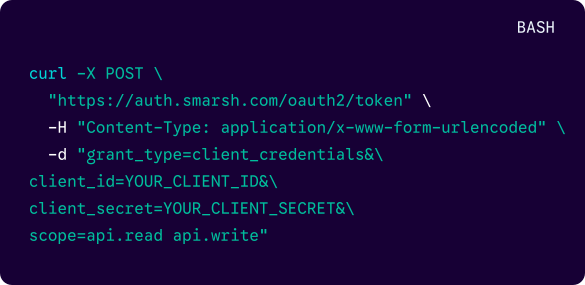
Use the OAuth 2.0 Client Credentials flow to obtain a short-lived JWT bearer token. Include it as a bearer token with each authorized API request and refresh it before it expires.

Start your integration
Review the documentation, test the available endpoints, and connect Smarsh with your workflow.
Authentication
Smarsh APIs use OAuth 2.0 Client Credentials to provide secure, service-to-service access without individual user sign-ins. Store credentials securely, cache the short-lived JWT bearer token, and renew it before expiration to keep your integration running without interruption.

Start working with Smarsh APIs
Extend your Smarsh deployment or develop a connector for your communications compliance workflows.