AskSmarsh AI Lets You Search Archives in Plain Language
AskSmarsh AI lets you search archived communications, build reports, and prepare exports by describing what you need in plain language. You already work this way with Claude or ChatGPT. Many archive tools still make you translate a question into fields, operators, and Lucene syntax, then switch screens to report and export. AskSmarsh AI is designed to make communication simple and cut that translation work.
Key takeaways
- Search archived communications in plain language instead of Lucene syntax.
- Move from search to report to export in one conversational workspace.
- Review and edit the interpreted query logic before you rely on results.
- Resolve a person’s name to associated identities across email, Slack, Bloomberg, and mobile.
- Keep Enterprise Archive permissions and audit logging in place for conversational requests.
Where archive search slows teams down
Responding to a regulatory inquiry, legal hold, or records request starts with a question. But finding answers in an archive often requires specialized search skills and knowledge of the system, slowing teams down.
Search requires knowing how the system works
Participants, date ranges, channels, keywords, and attachments all affect results. You translate your question into those parameters before you can tell whether you’re looking in the right place.
Related tasks live in separate workflows
Finding communications is often the first step. Teams then need a report or an export for further review. Each move between screens adds steps and makes it harder to keep the original request in view.
Expertise becomes a bottleneck
When a workflow depends on specialized search knowledge, experienced users become the people other team members rely on. New hires need more help, and routine requests compete with higher-value work. For IT and data teams, that can mean fielding search and report requests from other departments.
AskSmarsh AI is designed to reduce that friction by letting you begin with the outcome you need.
How AskSmarsh AI turns questions into searches
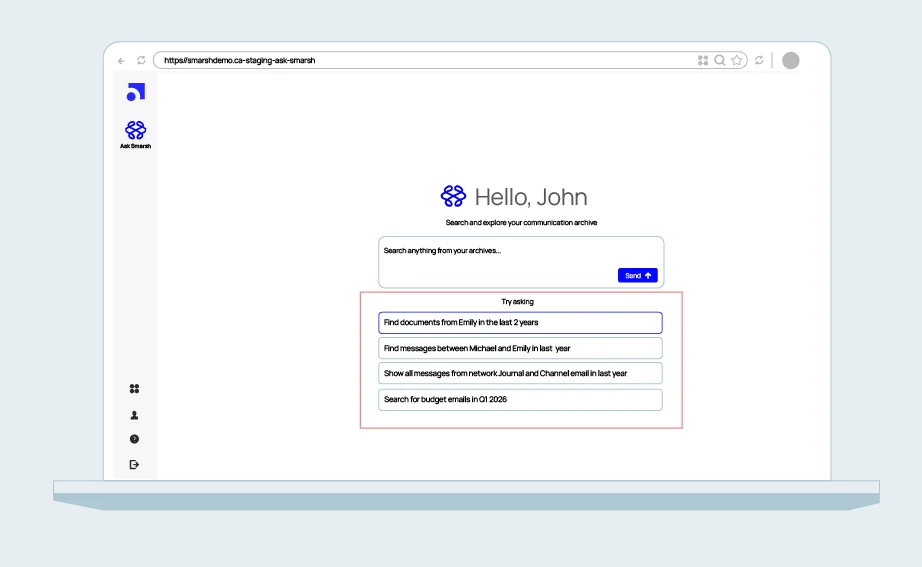
AskSmarsh AI connects natural-language requests to the search and reporting capabilities in the Smarsh Platform. You describe the task, and the interface translates it into an actionable request.
Describe the request in plain language
A compliance officer might start with the search: Show me emails from John Smith last month.
AskSmarsh AI is designed to translate that into structured search criteria for participants, date range, channels, and attachment filters.
Reports work the same way. The demo above shows a user building one through conversation.
Check how the request was parsed
Natural language makes a request easier to express, but it also introduces ambiguity. The design includes visible, editable query logic, so you can see how the request was parsed. Confirm the search covers the right person, period, and communications before you rely on the results.
Resolve a name to associated identities
A name rarely maps to a single identifier. The same person can appear as an email address, a Slack handle, a Bloomberg ID, and a mobile number. AskSmarsh AI is designed to resolve a name to those associated identities, so you don’t have to list them by hand.
Keep search, reporting, and export in one session
The interface lets you move from question to structured output without rebuilding context. You can search archived communications, generate reports, and prepare investigation-ready exports from one conversational interface.
See a report built through conversation
A user requests a policy storage footprint report, supplies its name and frequency, reviews the configuration, and runs it. The output appears beside the conversation.
A simpler interface still needs governance
For technical teams, governance is the first question to ask about any conversational interface. AskSmarsh AI is designed to inherit the Enterprise Archive permission model, so a conversational request doesn’t create new entitlements to communications. Audit logging of queries, user identities, and retrieval actions is part of the design.
Access follows the same governed model whether a user selects filters or types a question. Human review still matters: verify the search scope, inspect the relevant communications, and apply professional judgment before relying on or sharing AI-generated output.
Advantages and tradeoffs of conversational search
Conversational search changes how much effort a request takes. It also adds considerations that technical teams should plan for.
The advantages of conversational search can include:
- Fewer steps for multi-condition searches
- Context that carries from search to report to export
- Less reliance on a few query specialists
- Faster onboarding for new team members
However, it also has limitations, which can include:
- Ambiguity in natural language, which makes reviewing the interpreted query essential
- Results that are only as well scoped as the prompt, so specific requests work best
- Access limits set by existing archive permissions, which need to be accurate
- Human verification of AI-generated output before anyone relies on it
Put more of your communications data to work
Organizations already preserve communications to meet regulatory obligations. AskSmarsh AI is designed to make that governed information easier for authorized teams to use.
- IT and archive administrators: generate structured reports in natural language, without SQL or dashboard expertise.
- Data and AI teams: get a governed path to communications data through the MCP Server and API Developer Center.
- Compliance officers: express a search directly instead of building it field by field.
- Legal teams: bring relevant communications closer to the question under investigation.
- Records managers: reach reporting through conversation, without starting in a separate technical interface.
The aim is a shorter path from a business question to the information needed to act on it.
Signs conversational search is worth exploring
You may benefit from AskSmarsh AI if:
- Routine search and report requests queue up behind a few specialists
- Investigations require moving between search, reporting, and export screens
- New team members need query syntax training before they can run searches
- You’re deciding how approved AI clients and workflows should access archived communications
When you evaluate any conversational search tool, confirm three things:
- Query logic you can inspect and edit
- Permissions inherited from the underlying archive
- Audit logs for queries, user identities, and retrieval actions
Extend governed communications data to AI workflows
The Smarsh Platform captures, preserves, and enriches communications data across your channels, supporting compliance, supervision, discovery, and enterprise intelligence. AskSmarsh AI is part of a broader move toward a connected intelligence platform. Recent additions include:
- Discovery Agent: Uses a patent-pending Semantic Context Graph to help legal teams understand relationships and context.
- Intelligent Agent: Extends supervision with models for non-financial misconduct.
- MySearch Agent: Helps employees search their own archived communications and authorized delegated mailboxes.
- MCP Server: Connects external AI clients and workflows to Smarsh Interaction Intelligence through an enterprise access layer.
- ECA and Relativity API integrations: Connect assessment and review workflows.
- New Capture integrations: Extend the governed data foundation to Amazon Bedrock, Google Workspace, and Anthropic Claude.
Together, these capabilities make preserved communications more useful across the enterprise, while keeping governance central to how people and approved agents interact with that data. Our agentic intelligence launch overview covers the announcements in more detail.
Request an AskSmarsh AI demo to see how it fits your archive and to ask about availability for your organization.
Frequently asked questions
AskSmarsh AI is a conversational AI interface designed to help compliance officers, legal teams, records managers, and IT administrators search archived communications, generate reports, and export results using natural language.
No. Natural-language search is designed to reduce that requirement. You describe what you need, then review the interpreted criteria to confirm the search matches your intent.
It is designed to inherit the Enterprise Archive permission model, so a conversational request isn’t intended to expand what a user can access. Audit logging of queries, user identities, and retrieval actions is part of the design.
AskSmarsh AI focuses on professional search, reporting, and export workflows. MySearch Agent focuses on employee self-service access to their own archived communications and explicitly authorized shared or delegated mailboxes.
No. Users remain responsible for reviewing the underlying information and deciding how to use it.
Share this post!

- AskSmarsh AI Lets You Search Archives in Plain Language - November 9, 2026
- Why IT Teams Are Choosing Smarsh Over Building Their Own AI - October 5, 2026
- What Can You Do With MCP? - September 21, 2026
Smarsh Blog
Our internal subject matter experts and our network of external industry experts are featured with insights into the technology and industry trends that affect your electronic communications compliance initiatives. Sign up to benefit from their deep understanding, tips and best practices regarding how your company can manage compliance risk while unlocking the business value of your communications data.
Ready to enable compliant productivity?
Join the 6,500+ customers using Smarsh to drive their business forward.

More Resources





Subscribe to the Smarsh Blog Digest
Subscribe to receive a monthly digest of articles exploring regulatory updates, news, trends and best practices in electronic communications capture and archiving.
Smarsh handles information you submit to Smarsh in accordance with its Privacy Policy. By clicking "submit", you consent to Smarsh processing your information and storing it in accordance with the Privacy Policy and agree to receive communications from Smarsh and its third-party partners regarding products and services that may be of interest to you. You may withdraw your consent at any time by emailing [email protected].
FOLLOW US